Please connect the TV light strip and the matching sync box to the computer first to see if they can be synced.
If yes, it means that the TV light strip is normal, please see below:
Here is some troubleshooting about the TV light strip cannot sync with the external streaming device.
1. Ensure to use of the correct external input source. TV BOX/PS/XBOX/Apple TV (such as Roku, Switch, etc.)
2. Please Note - You can only sync with HDMI devices, not with TV apps. This is because the sync box needs to read the video source via HDMI.
3. Ensure the HDMI port is connected correctly. <in> connects to the signal input end, and <out> connects to the TV end, as shown in the picture.
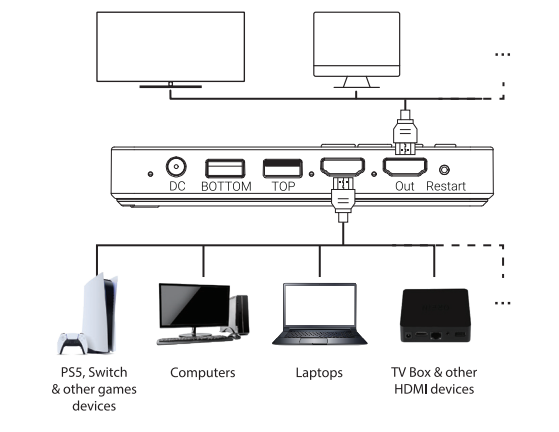
4. When the external input source box is turned off, if you want to turn on the TV screen, you need to turn on the external input source box first, and then click the screen interface (Immersive Entertainment function) in the Aidot APP.
5. If you want to wake up the light strip through the TV, you need to keep the sync box in the screen mode, and you cannot turn off the sync box, you can only turn off the signal input box. Such as Roku, Switch, etc. Then the light strip will light up automatically the next time you start Roku or Switch.
6. You need to manually select the input source every time you change the HDMI input source on the TV.
7. CEC is not supported.
MORE SUPPORT: https://www.aidot.com/s/LK.MusicSyncBox.A001398